2026.11.11
VOCALOID7 Overview: Key Changes from VOCALOID6
On November 11, 2026, we released VOCALOID7 as a paid update. This article explains the key changes and important information from VOCALOID6 for users of VOCALOID6 and earlier versions.
Important Precautions
- VOCALOID7 is a major evolution from VOCALOID6. Since VOCALOID7 is installed as separate software from VOCALOID6, you can use both VOCALOID6 and VOCALOID7 on the same computer.
- VOCALOID7 includes improvements in vocal expression and many new features. As a result, the audio output may change when you open projects created in VOCALOID6 or earlier. When you save a project opened in VOCALOID7, it is saved in the VOCALOID7-specific file format (vprx), so the original project will not be overwritten.
- VOCALOID7 uses the new VOCALOID7 Authorizer for authorization. VOCALOID7 Authorizer is installed along with VOCALOID7 Editor.
Please refer to the following article for details on the authorization.
目次
New Features in VOCALOID7: Added Capabilities for Enhanced Expressiveness and Editing Efficiency
-Significantly enhanced integration with Cubase — Seamless VOCALOID production
-Easily Switch Singing Vocal Characteristics: VOICE TYPE Selector Added
-Effortlessly Fine-Tune Sound Attack Sharpness: ATTACK Parameter Added
-Dramatically Boost Editing Efficiency by Locking Pitch Curves: Fix Pitch to Notes Feature Added
-Achieve Rhythmic Vocal Performance Without Manual Timing Adjustments: Pronunciation Timing Equalization
-Delicate Vocal Nuances Beyond Musical Notes: Insert Breaths and Silence at Any Position
-Compare Arrangements While Preserving Melody Data: Note and Part Mute Tools Added
-Evolving Toward Standard DAW Conventions: Shift to One Voicebank Per Track
New Features Added to Help Beginners Enjoy VOCALOID Production
-Understand Features Without Opening the Manual: Context-Aware Tooltips Added
-Displaying Character Images to Enhance the Creative Experience — Support for Transparent Voicebank Images
-An Interface to Experience the Joy of Sound Shaping — Tone Control with the Expression Knob
-Streamline Song Production from Existing Files: Support for Importing Non-VOCALOID Software Formats
Compatibility with VOCALOID6 and Other Software
-Voicebank Compatibility
-Compatibility with Legacy Versions
-Features Deprecated / Removed in VOCALOID7
-Using Previous Versions Alongside VOCALOID7 Editor
New Features in VOCALOID7: Added Capabilities for Enhanced Expressiveness and Editing Efficiency
With VOCALOID7, we have improved the quality of synthesized vocals and added many new features. You can now enjoy a smoother, stress-free VOCALOID creation experience.
Significantly enhanced integration with Cubase — Seamless VOCALOID production
Significantly enhanced integration with Steinberg's DAW, Cubase—a Yamaha group company. You can now use VOCALOID7 Editor within Cubase as if it were a native Cubase feature.
We have achieved complete synchronization across many elements essential for music production—not only transport control, but also editing parts, notes, and lyrics.
For details, please refer to the following article.
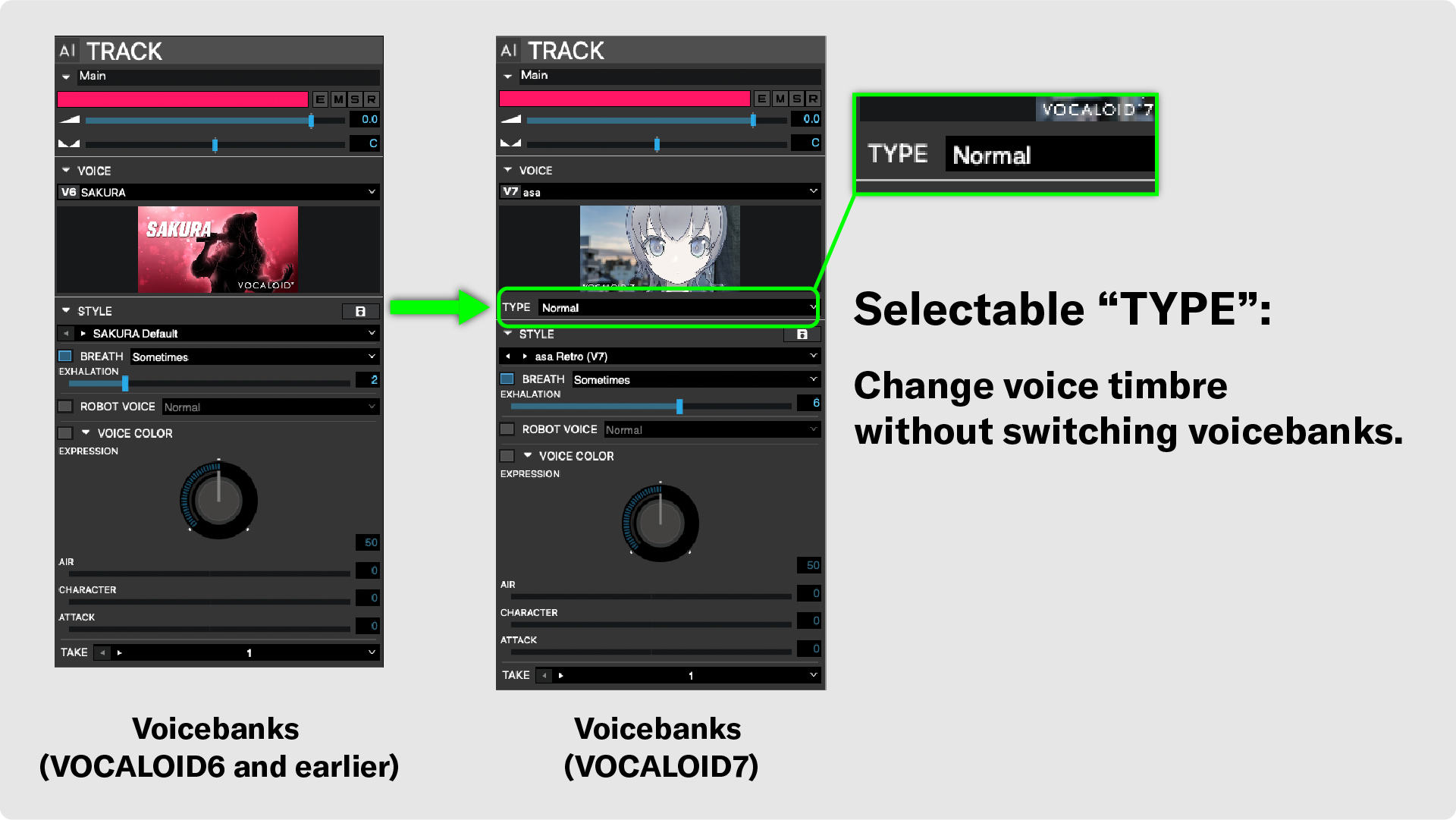
Easily Switch Singing Vocal Characteristics: VOICE TYPE Selector Added
In VOCALOID:AI voicebanks for VOCALOID7 and later, a TYPE switching feature has been added. Multiple TYPEs are available within the same voicebank, allowing you to change the vocal character of a single singer, similar to switching between different voicebanks in earlier versions. This enables you to alter the overall tone and feel without changing the voicebank or performing detailed edits.
- The VOICE TYPE feature is only supported on VOCALOID:AI voicebanks designed for VOCALOID7. It cannot be used with VOCALOID6 or earlier voicebanks.
Effortlessly Fine-Tune Sound Attack Sharpness: ATTACK Parameter Added
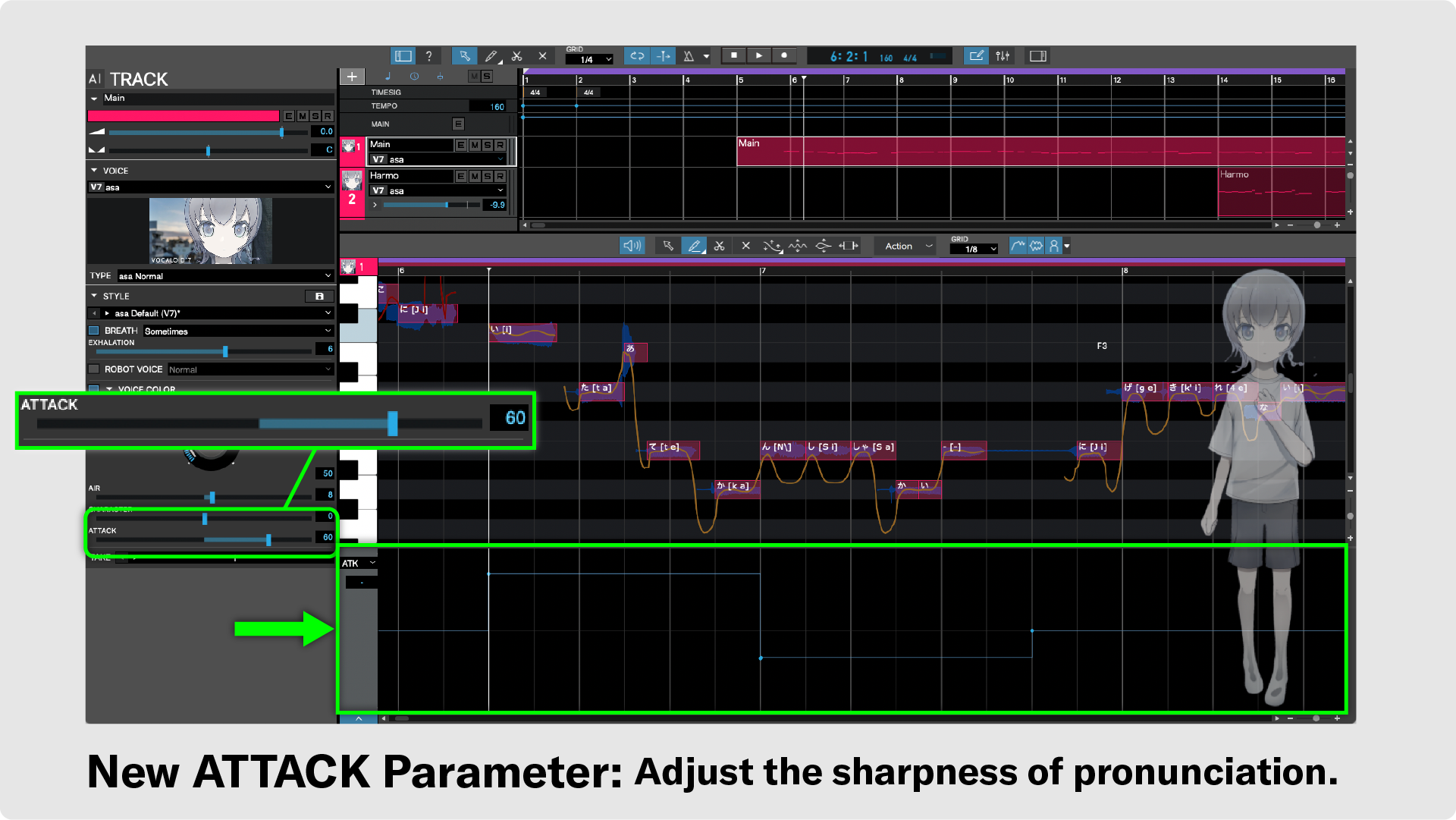
In VOCALOID:AI voicebanks for VOCALOID7 and later, an "ATTACK" parameter has been added to the VOICE COLOR settings, allowing you to easily adjust the sharpness of articulation. You can express dynamics using just the ATTACK parameter without making detailed adjustments.
You can also draw automation in the control parameter lane. This makes it simple to combine crisp, sharp attacks and softer pronunciations within a single melody.
- The ATTACK parameter is only supported on VOCALOID:AI voicebanks designed for VOCALOID7. It cannot be used with VOCALOID6 or earlier voicebanks.
Dramatically Boost Editing Efficiency by Locking Pitch Curves: Fix Pitch to Notes Feature Added
In VOCALOID:AI voicebanks, pitch curves are determined not only by a single entered note, but also by its relationship to surrounding notes. Consequently, the pitch curves of unedited notes may sometimes change unexpectedly.
For example, editing a note immediately before a sustained note may alter the pitch curve of that sustained note.
The newly added "Fix Pitch to Notes" feature allows you to lock the pitch curve of specific notes in their current state.
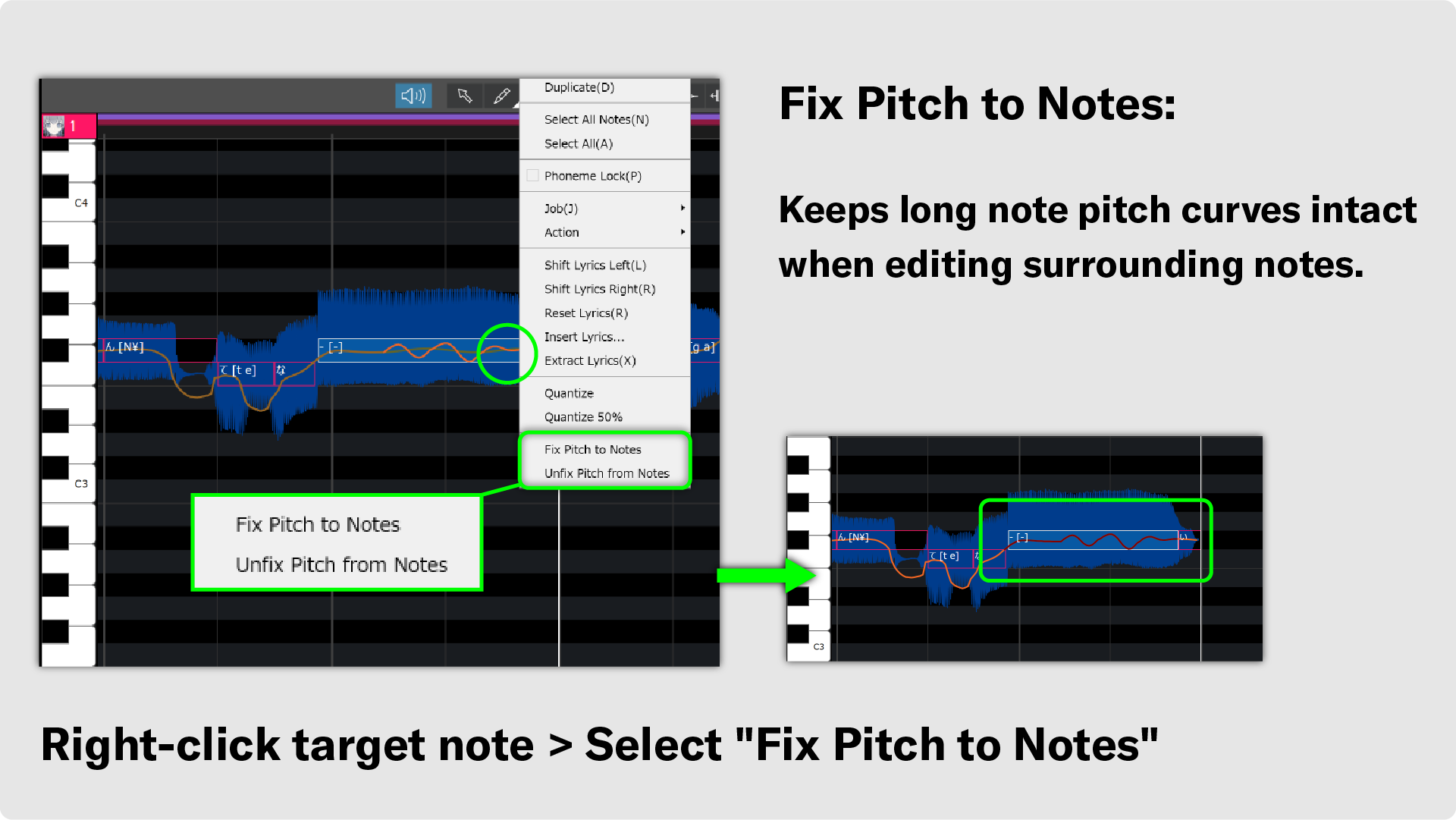
The Fix Pitch to Notes feature remains active even if you change the voicebank. For example, if you make edits using a VOCALOID:AI voicebank, apply Fix Pitch to Notes, and then switch to a VOCALOID3–VOCALOID5 voicebank, the pitch curve generated by VOCALOID:AI will be kept. This can simplify your editing workflow when using VOCALOID3–VOCALOID5 voicebanks.
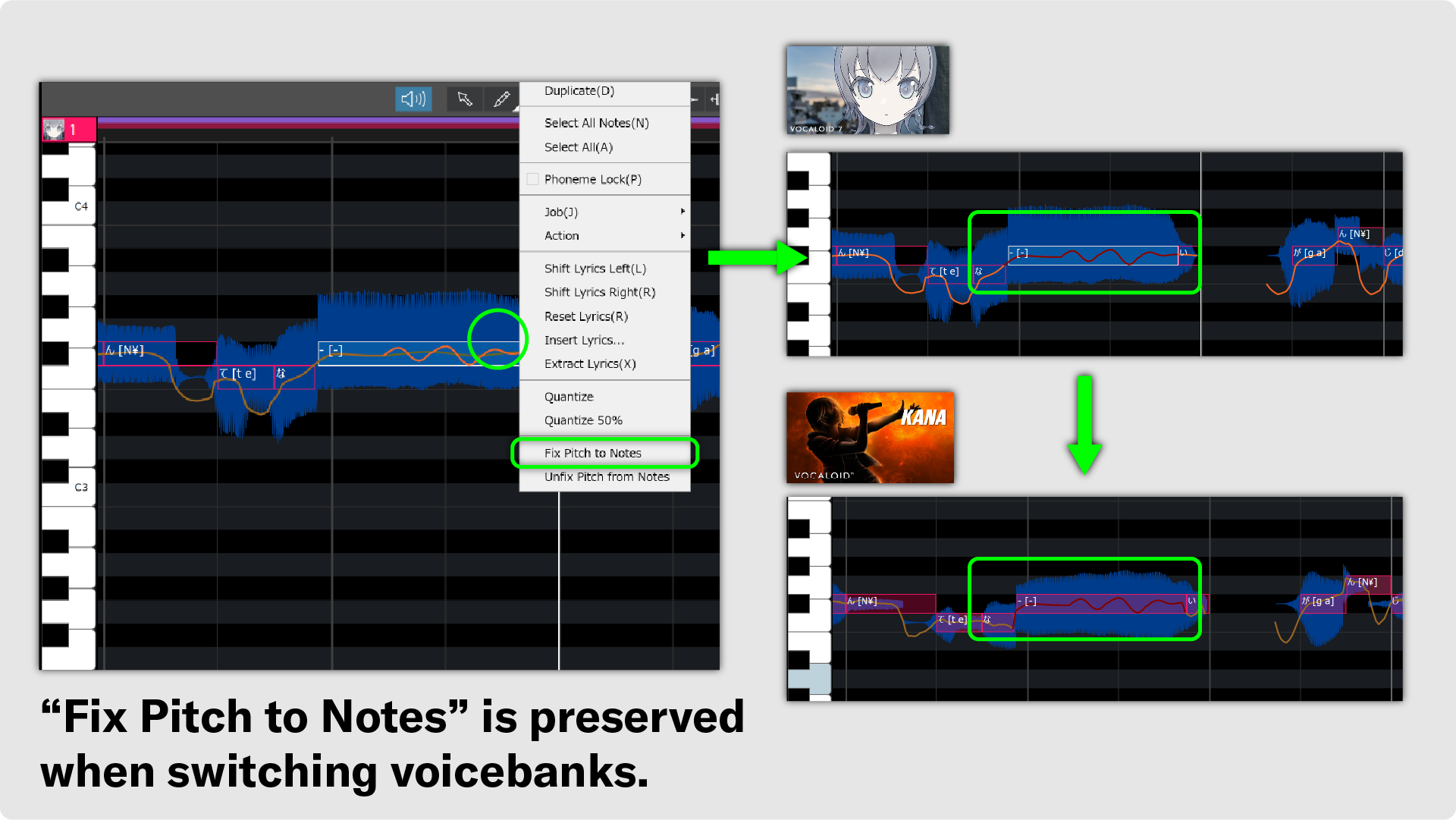
Conversely, you can also lock the pitch curve generated with VOCALOID3–VOCALOID5 voicebanks and apply it to a VOCALOID7 voicebank. Using this method allows you to replicate classic "Vocaloid-style" singing with VOCALOID7 voicebanks.
Achieve Rhythmic Vocal Performance Without Manual Timing Adjustments: Pronunciation Timing Equalization
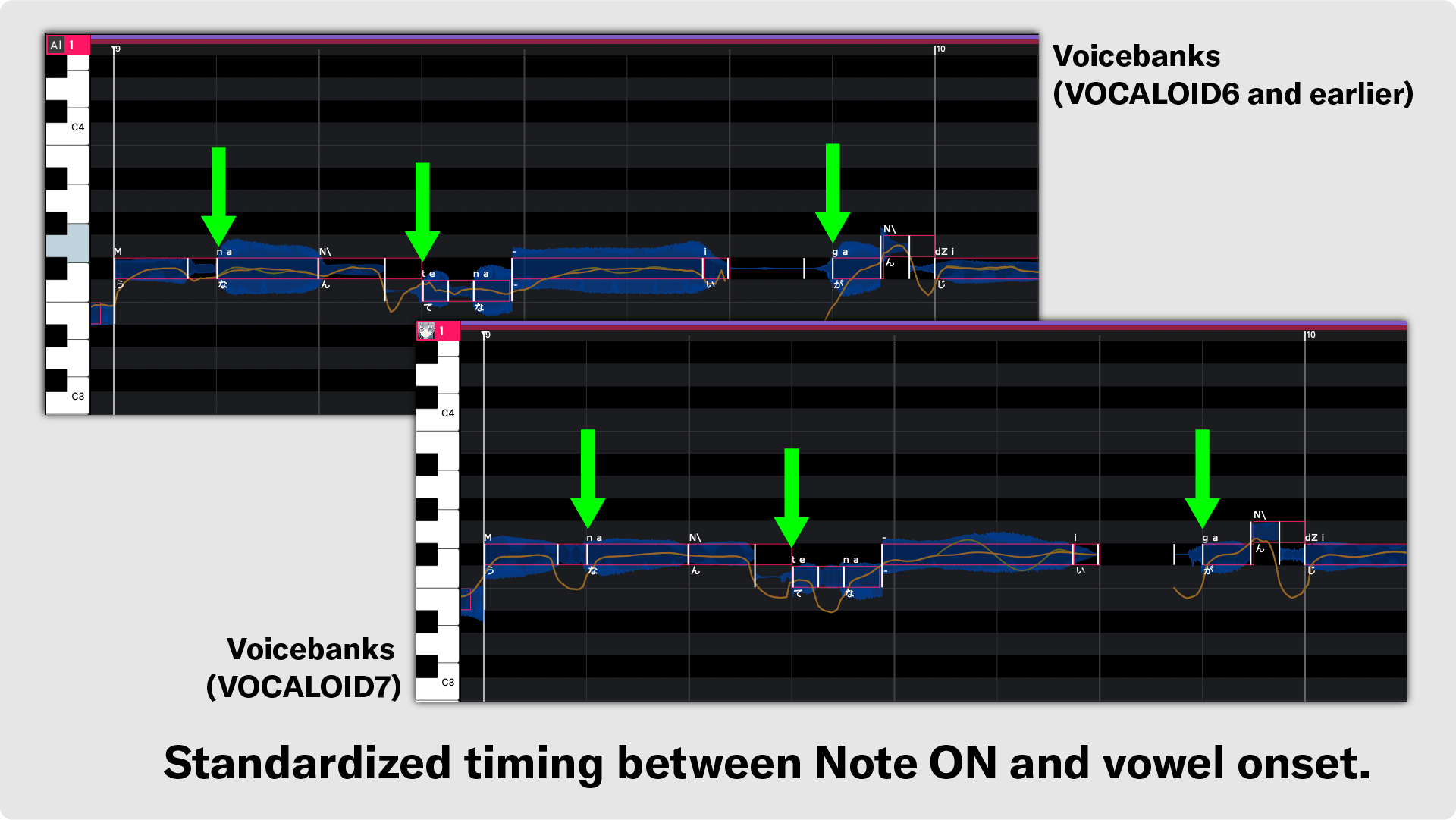
In human singing, consonants are naturally pronounced slightly before the beat, while vowels begin around the note timing.
The voice synthesis engine in VOCALOID7 reduces variations in pronunciation timing compared to VOCALOID6. The Note-On timing is adjusted to align with the start of each vowel, delivering great rhythmic singing.
- This change applies only to VOCALOID:AI voicebanks. There are no changes to the behavior of VOCALOID5 and earlier voicebanks.
Delicate Vocal Nuances Beyond Musical Notes: Insert Breaths and Silence at Any Position
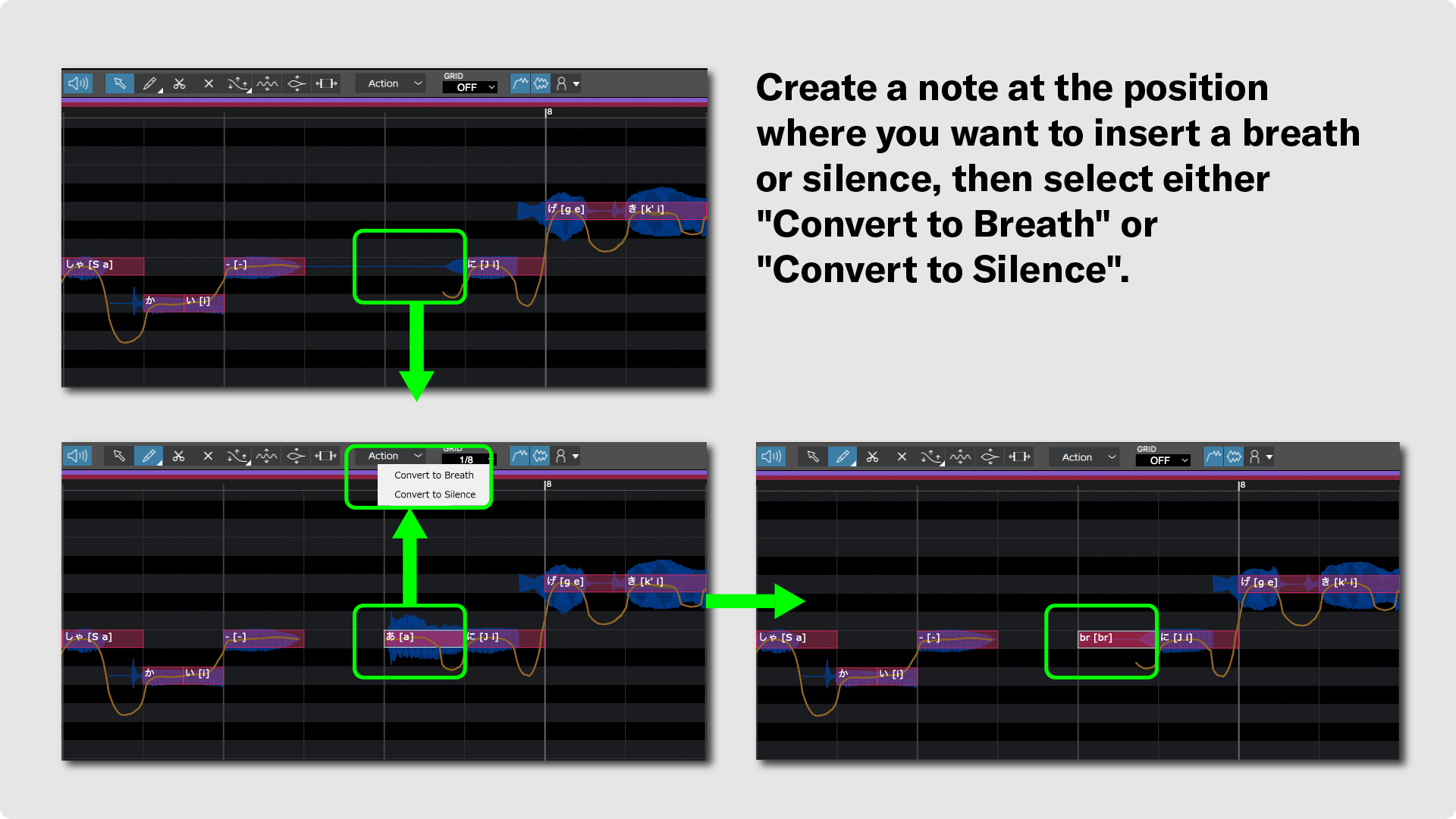
For VOCALOID:AI voicebanks, you can now silence (Sil) or convert specified notes into breaths (br). Simply enter a dummy note at the location where you wish to insert silence or a breath, and select either "Convert to Breath" or "Convert to Silence" from the "Action" menu.
Because you can now place silence or breath sounds at any desired position, you can achieve more human-like singing and highly rhythmic vocal performances.
- This functions identically to entering "Sil" and "br" in previous versions.
Compare Arrangements While Preserving Melody Data: Note and Part Mute Tools Added
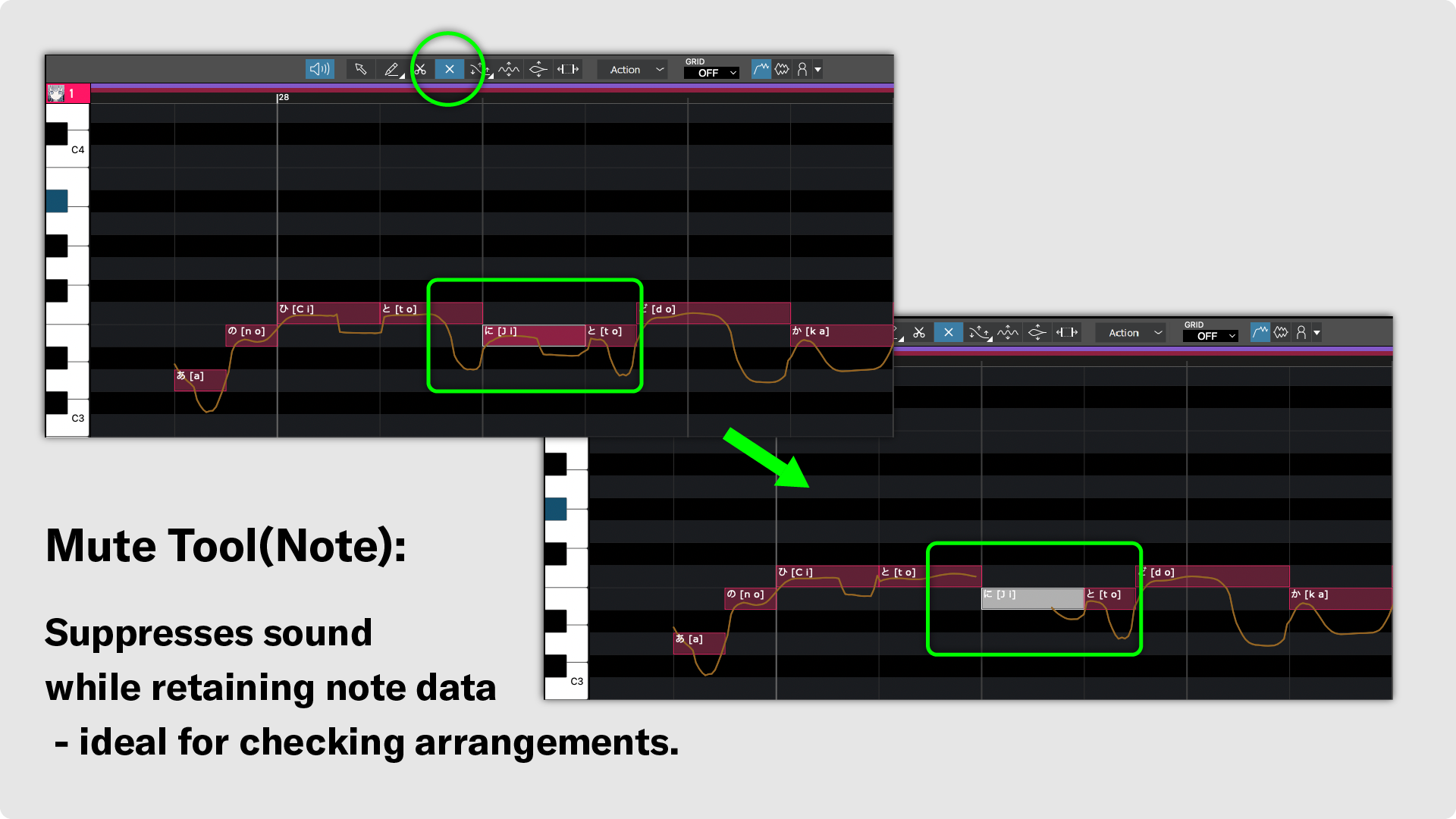
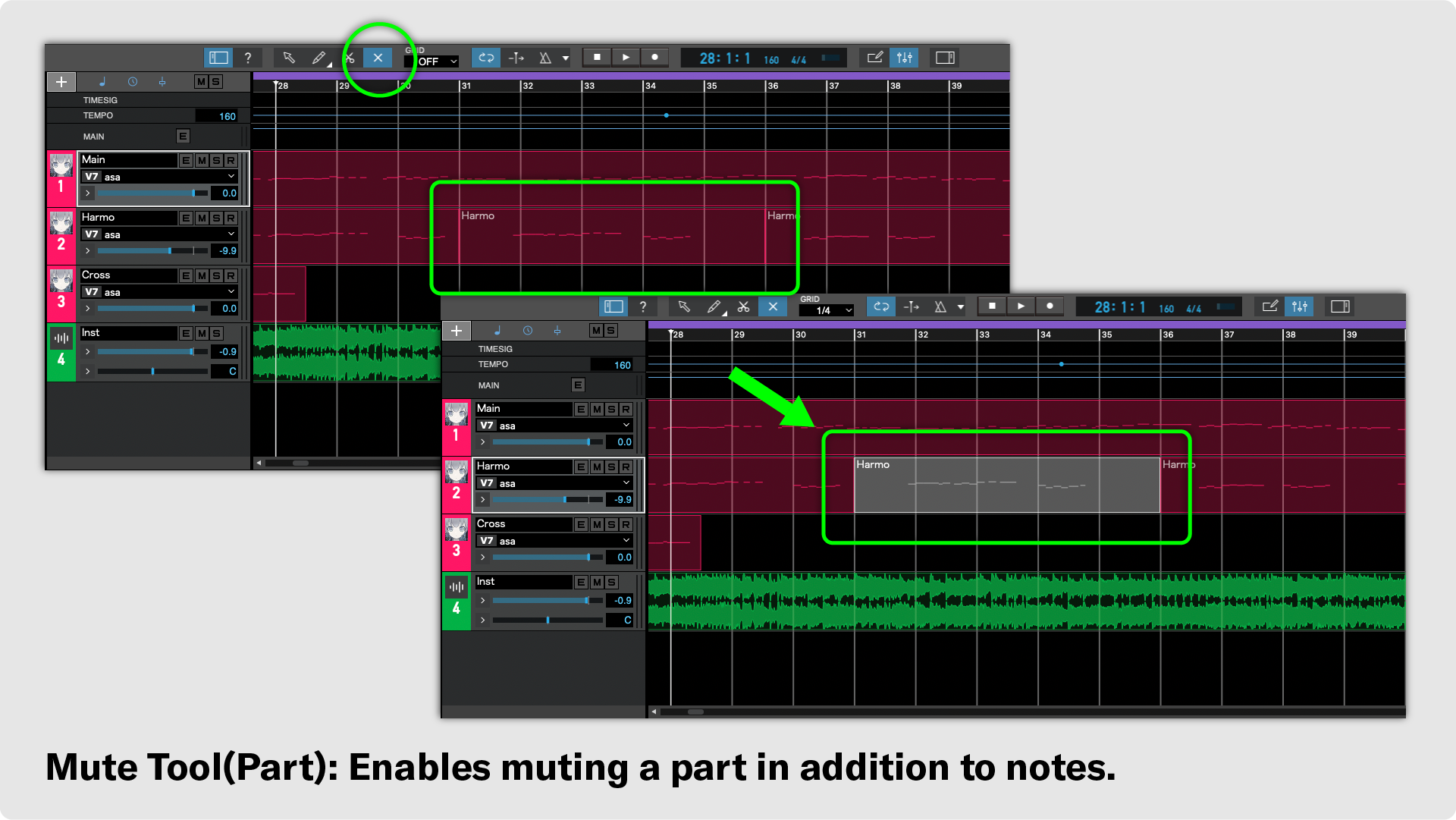
A Mute Tool for notes and parts has been added to the editing tools. Because you can mute audio playback while keeping the entered data intact, comparing your project with and without specific notes or parts becomes quick and simple.
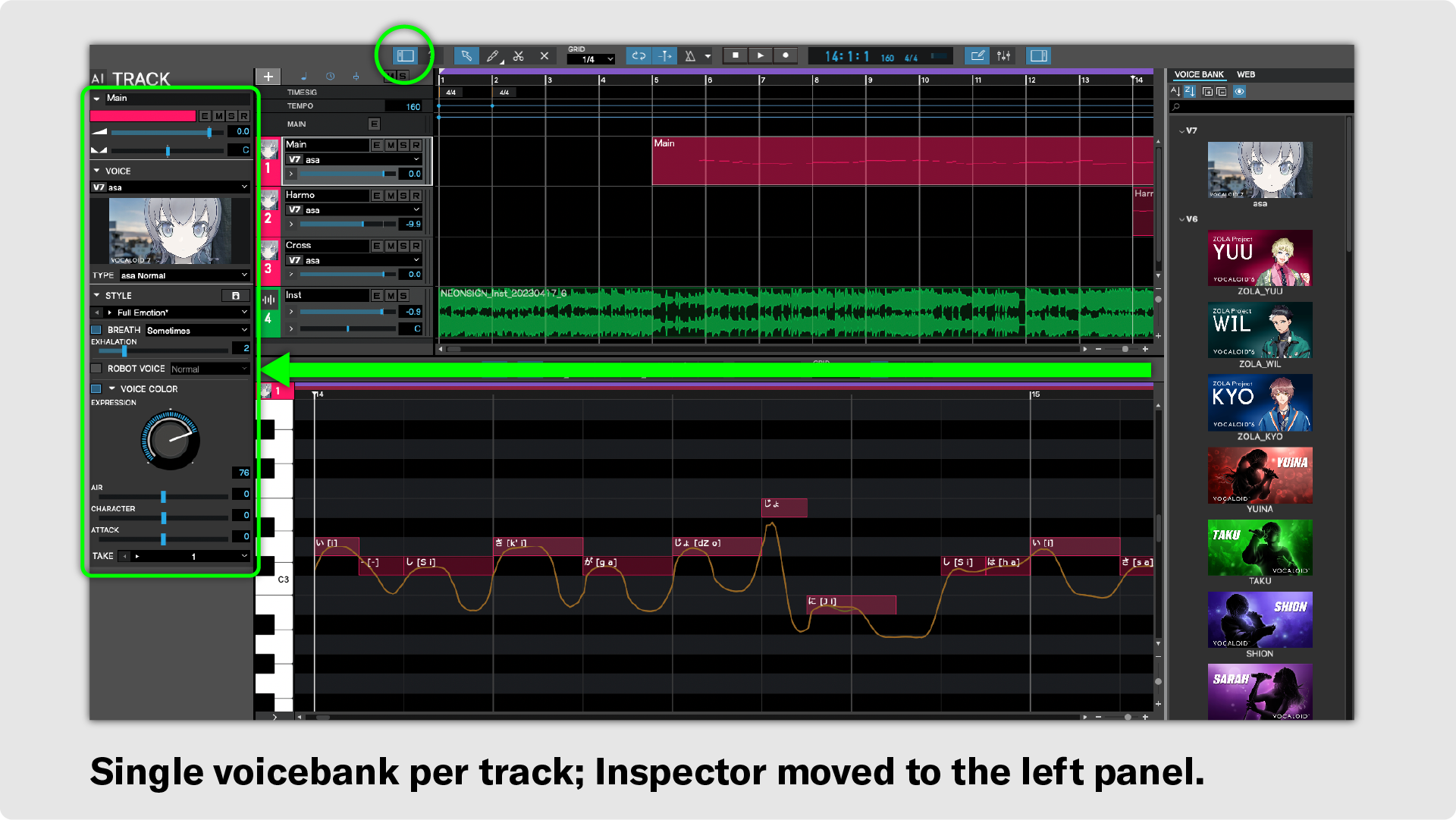
Evolving Toward Standard DAW Conventions: Shift to One Voicebank Per Track
Because the VOCALOID Editor is frequently used alongside DAW software, changes have been made to align its user interface with industry-standard DAW layouts.
In VOCALOID7 Editor, voicebank assignment is now restricted to one per track. This change aligns with the standard DAW user interface model where each track is dedicated to a single sound source.
Along with this change, the track information display (Inspector), which was previously located on the right side, has been moved to the left side.
- Notes when loading legacy project files:
If you import a project where multiple voicebanks are assigned to a single track (such as projects with different voicebanks assigned to individual parts), the voicebank of the earliest part on that track will take precedence, and all subsequent voicebanks on that track will be automatically updated to match it.
New Features Added to Help Beginners Enjoy VOCALOID Production
These functional improvements were designed not only to streamline advanced editing workflows, but also to ensure that creators just starting out with VOCALOID production can enjoy a smooth and fun creative experience.
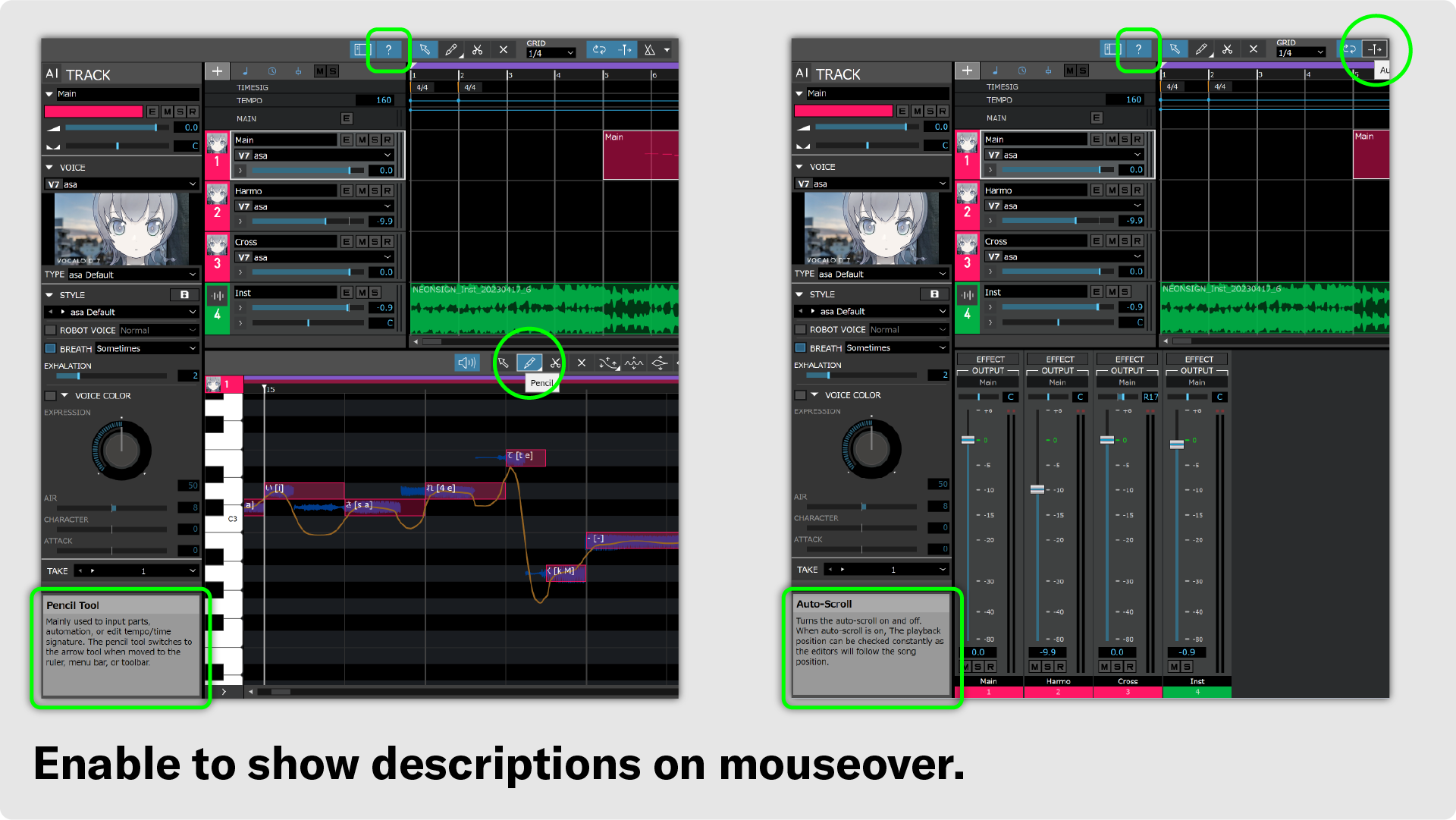
Understand Features Without Opening the Manual: Context-Aware Tooltips Added
A context menu (tooltips/help overlay) has been implemented to explain feature functionality and recommended setting guidelines directly within the software. This allows you to quickly understand controls without needing to open the manual.
Displaying Character Images to Enhance the Creative Experience — Support for Transparent Voicebank Images
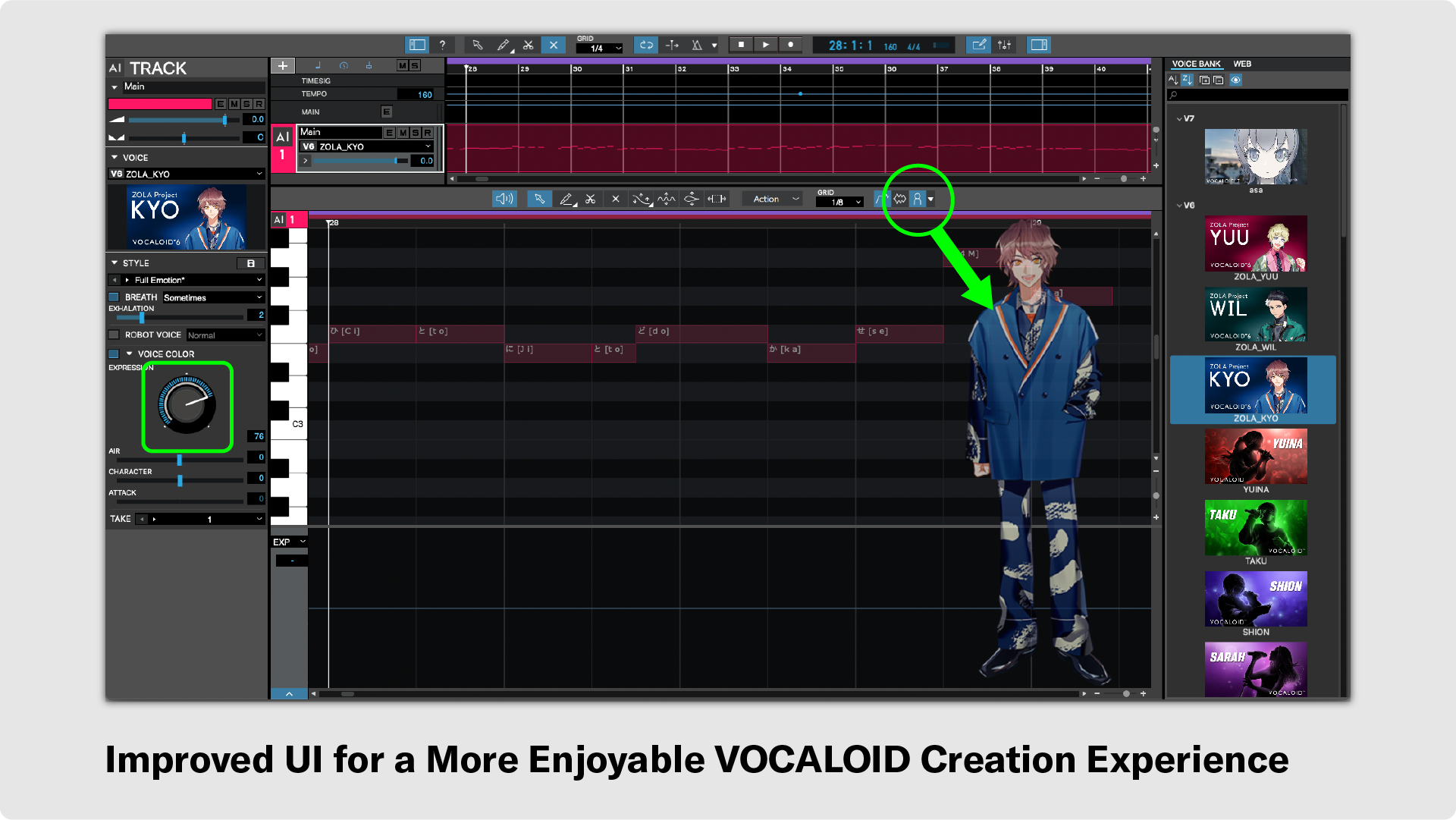
You can now display a semi-transparent image of the active voicebank on the Musical Editor. This not only makes it easy to see which voicebank is currently selected, but also helps you visualize the singer performing your track, boosting creative motivation during production.
It is also possible to display any custom image with transparency, not just the Voicebank images.
An Interface to Experience the Joy of Sound Shaping — Tone Control with the Expression Knob
The Expression parameter for VOICE COLOR can now be controlled using a knob. This makes it easy to experience the fun of changing tone colors.
- The only voicebank included with the VOCALOID7 Editor is "asa". Voicebanks from VOCALOID6 and earlier shown in images (such as ZOLA Project) are sold separately.
Streamline Song Production from Existing Files: Support for Importing Non-VOCALOID Software Formats
Support has been added for importing project data from vocal and speech synthesis software other than VOCALOID. You can import project files made available by existing creators and edit them directly inVOCALOID7 Editor, making it easy to jump right into VOCALOID production.
| MIDI File | Standard MIDI File (SMF) used across general DAWs. |
| PPSF File | Project file format for Piapro Studio. |
| SVP File | Project file format for Synthesizer V (Synthesizer V Studio). |
| UST File | Standard project file format for UTAU. |
| CCS File | Project file format for the CeVIO series (CeVIO Creative Studio / CeVIO AI). |
| TSSLN File | File format used by VoiSona synthesis engines and related solution software. |
| MusicXLN File | A custom score/lyrics data format (or intermediate export/import format for specific software) built upon MusicXML. |
| MXL File | Compressed MusicXML format (ZIP-compressed) standard across score-writing software (Finale, Sibelius, Dorico, MuseScore, etc.). |
| WAV File | Standard audio file format. |
| MP3 File | Standard MP3 audio file format. |
- PPSF Files: Time signature, tempo, notes, lyrics, and phonetic symbols are imported.
- The imported content may vary depending on the project data, so please review your data after loading.
- Usage Rights: When using third-party or distributed project data, please ensure you review and respect the licensing terms specified by the original content owner.
Compatibility with VOCALOID6 and Other Software
VOCALOID7 maintains compatibility with VOCALOID6. Even if you currently use VOCALOID6, you can upgrade to VOCALOID7 with peace of mind.
Voicebank Compatibility
VOCALOID7 Editor supports voicebanks from VOCALOID3 and later. If a voicebank is already installed on your PC, you can use it in VOCALOID7 Editor without any special setup.
- Even when using the same voicebank, the synthesized audio output will differ depending on the version of VOCALOID Editor.
Compatibility with Legacy Versions
VOCALOID7 Editor uses a dedicated project format, "VPRX" (file extension: .vprx), when saving projects.
Projects and data created in older versions using formats other than VPRX can be loaded using the import function. Please save any imported data as a VPRX file.
| VPR File | Project format for VOCALOID5 and VOCALOID6. |
| VSQX File | Project format for VOCALOID3 and VOCALOID4. |
Features Deprecated / Removed in VOCALOID7
VOCALO CHANGER function
Because the VOCALO CHANGER function is now provided as a audio effect plugin (VST/AU/AAX), it has been removed from the VOCALOID Editor. Going forward, please use the audio effect plugin version within your DAW software.
- VOCALO CHANGER PLUGIN is sold separately.
MEDIA function
In VOCALOID7, you can import and play audio files such as backing tracks and karaoke tracks, as well as import and use VOCALOID sequence files that you have created and saved.
Using Previous Versions Alongside VOCALOID7 Editor
VOCALOID7 Editor is separate software from previous versions of VOCALOID. Installing VOCALOID7 Editor will not uninstall previous versions of VOCALOID Editor, so you can continue to use them alongside VOCALOID7 Editor.
If you want to edit a project created in a previous version, launch VOCALOID6 Editor or the corresponding previous version of VOCALOID Editor and open the project.